
Effective inventory control is the backbone of any professional clinic or retail pharmacy. In medical dispensing, managing stock purely by total quantity is insufficient—medicines carry critical batch numbers, varying expiration dates, and fluctuating procurement costs.
Clinic Commerce Manager introduces native, high-performance First-In, First-Out (FIFO) batch management directly within WooCommerce Medicine Batch Tracking. This guide covers how the FIFO system works, how to configure batches, and how automated cost tracking operates during daily clinical dispensing.
1. What is First-In, First-Out (FIFO) Inventory Control?
First-In, First-Out (FIFO) is an inventory valuation and management method where the earliest acquired stock (the oldest batch) is sold or dispensed first.
Why FIFO Matters for Medical Dispensaries:
- Expiry Prevention: Ensures older stock near expiration is dispensed before newer arrivals, minimizing inventory write-offs.
- Accurate Profit Tracking: Accounts for cost price fluctuations across different shipments, giving an exact Cost of Goods Sold (COGS) calculation.
- Regulatory Compliance: Maintains an audit trail linking dispensed orders directly to specific manufacturer batch numbers.
2. Managing Product Batches in the Admin Panel
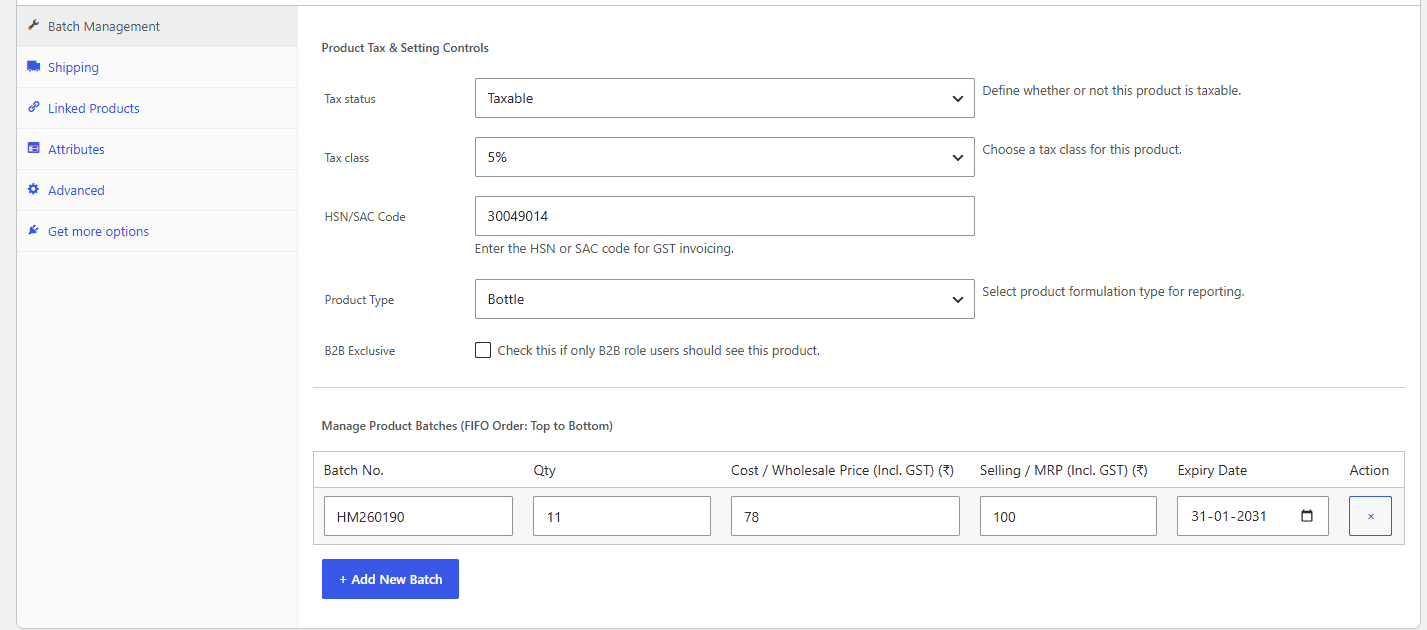
Every simple product in WooCommerce receives a dedicated Batch Management meta tab powered by Clinic Commerce Manager.
Adding & Editing Batches:
- Navigate to WordPress Admin > Products and open any medical product.
- Scroll to the Product Data panel and select the Batch Management tab.
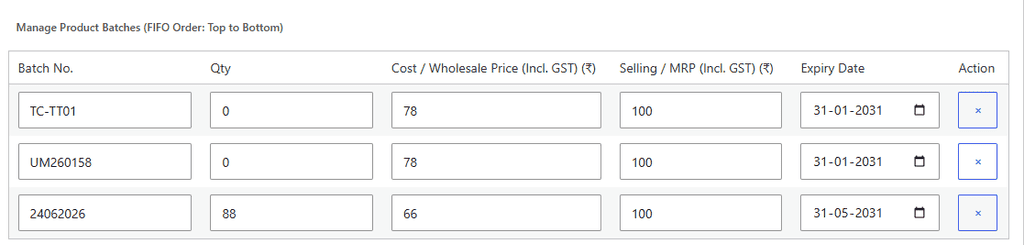
- In the Manage Product Batches table, you can enter multiple rows of stock sorted vertically from top to bottom (Top = Oldest/First Batch):
| Column Name | Description & Guidance |
| Batch No. | The manufacturer batch/lot identifier printed on the box/strip. |
| Qty | Current available units in this specific batch. |
| Cost / Wholesale Price (₹) | Purchase cost per unit (inclusive of GST) for margin calculations. |
| Selling / MRP (₹) | Retail selling price or MRP (inclusive of GST) to display at checkout. |
| Expiry Date | Expiration date of the batch (YYYY-MM-DD). |
- Click + Add New Batch to add subsequent shipments or lots.
- Click Update to save the product.
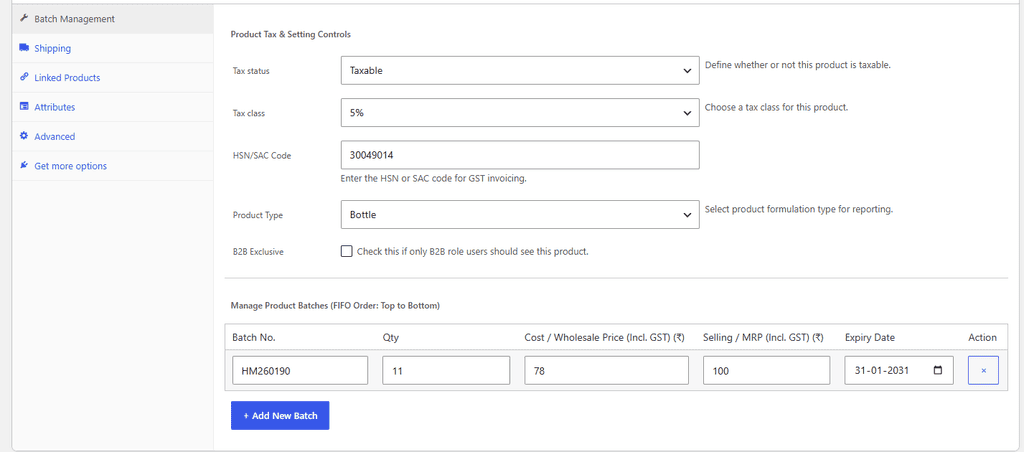
Note: The plugin automatically sums the stock quantities across all active batches and synchronizes WooCommerce’s native total stock quantity.
3. How Automatic FIFO Stock Deduction Works in Woocommerce medicine batch tracking
When an order is completed—whether at the clinic billing counter or through online checkout—the plugin automatically processes stock deduction following strict top-to-bottom FIFO priority:
- Top Batch Priority: The system inspects the top-most batch entry with a available quantity greater than zero.
- Sequential Depletion:
- If Batch A has 5 units and an order requests 8 units, the system depletes all 5 units from Batch A (setting its quantity to
0). - It then automatically rolls over to Batch B to deduct the remaining 3 units.
- If Batch A has 5 units and an order requests 8 units, the system depletes all 5 units from Batch A (setting its quantity to
- Audit Logging: An automated note is appended to the order details recording the exact batch breakdown (e.g.,
FIFO Batch Deduction: Batch B204: 5 units, Batch B208: 3 units).
4. Cost Price Snapshots & Net Profit Reporting
A common challenge in standard e-commerce setups is that changing a product’s price or cost in the backend alters historical sales data. Clinic Commerce Manager solves this with Cost Snapshots:
- At the moment of purchase, the exact unit cost of the active FIFO batch is “snapshotted” onto the order line item (
_batch_cost_snapshot). - When you generate the Clinic Net Profit & Distribution Report, historical profit metrics remain 100% accurate, even if product purchase costs double months later.
5. Expiry Tracking & Low-Stock Safeguards
In the WooCommerce medicine batch tracking of Clinic Commerce Manager wordpress plugin, To maintain counter efficiency during busy clinical hours we have the followin features:
- Auto-Price Sync: The active selling price and regular price displayed in the shop automatically align with the top active FIFO batch.
- Out-of-Stock Safeguard: When all batch quantities reach
0, the product status automatically toggles tooutofstock, preventing accidental over-dispensing. - Reporting Visibility: Expired or depleted batches remain stored in the backend database for historical reference while hiding from active customer queues.

Upgrade Your Pharmacy & Dispensary Terminal
Transform WooCommerce into a high-speed clinical dispensary terminal with automated FIFO batch tracking, instant GST tax invoicing, and seamless counter billing.
- ✓ Native FIFO Batch & Expiry Control
- ✓ Automated Intra-State & Inter-State GST Slabs
- ✓ Fast Counter Billing & Staff Permissions
- ✓ 100% Self-Contained — Zero Friction Setup
Proudly Created by Tamhane Health