
Managing a modern healthcare practice often involves balancing two completely distinct customer bases. On one side, you have retail patients purchasing individual medicines or over-the-counter wellness supplies. On the other side, you may supply partner physicians, satellite clinics, or bulk wholesale buyers requiring specialized medical formulations. This is called as WooCommerce B2B wholesale catalog.
Standard e-commerce setups typically display every product to every visitor, creating massive operational confusion. Clinic Commerce Manager introduces advanced role-based catalog controls, empowering you to maintain a WooCommerce B2B wholesale catalog alongside your standard retail store without friction.
1. Why Role-Based Product Separation Matters for Medical Practices
In clinical and pharmaceutical distribution, wholesale pricing, bulk packaging units, and prescription-only formulations must never mix haphazardly with retail storefronts. Allowing everyday retail consumers to view restricted wholesale inventory or bulk clinical catalogs leads to pricing discrepancies, regulatory non-compliance, and checkout errors.
By establishing a dedicated WooCommerce B2B wholesale catalog, you create an isolated, professional environment where verified clinic partners and bulk buyers can securely browse and purchase commercial-grade medical supplies.
2. Configuring B2B User Roles and Catalog Permissions
Implementing structured access control begins with defining distinct user roles inside your WordPress backend. Clinic Commerce Manager integrates natively with standard WordPress user permissions to segment your audience effectively.
Step-by-Step Catalog Restriction Setup:
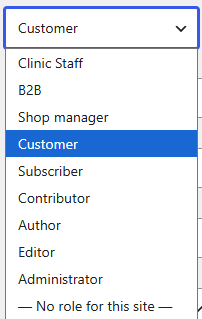
- Navigate to WordPress Admin > Users and assign approved bulk buyers or partner doctors the designated
B2B PartnerorWholesale Buyerrole. - Open any medical product in your inventory via Products > All Products.
- Locate the custom Catalog Visibility or B2B Exclusive settings panel introduced by the plugin.
- Toggle the restriction setting to hide the item from guest users and retail shoppers, ensuring visibility is limited strictly to logged-in wholesale accounts.

Once saved, retail visitors will see a clean, consumer-focused inventory, while authorized B2B partners unlock access to specialized bulk pricing and institutional product tiers.
3. Protecting Restricted Formulations with Direct URL Safeguards
A common vulnerability in basic e-commerce setups is that hidden or restricted products can still be accessed directly if a user guesses or shares the product page URL.
To maintain strict professional standards, a true WooCommerce B2B wholesale catalog must feature robust URL protection:
- Direct Access Interception: If an unauthenticated visitor or retail customer attempts to open a B2B-exclusive medicine URL, the system automatically redirects them or displays a polite notice.
- Wholesale Cart Verification: Checkout routines verify user role credentials before processing payments for restricted clinical supplies or bulk formulations.
- Audit Transparency: Administrative logs record wholesale order placements, linking them directly to verified institutional buyer accounts.
4. Managing Wholesale Pricing vs. Retail MRP
Wholesale procurement relies heavily on tier-based pricing structures and bulk discounts that differ entirely from retail Maximum Retail Price (MRP) values.
When configuring your WooCommerce B2B wholesale catalog, you can assign specialized wholesale cost matrices to ensure profit margins remain fully protected. Combined with the plugin’s native FIFO batch tracking and cost price snapshots, your accounting team receives accurate, audit-ready financial data for every bulk transaction processed through the portal.
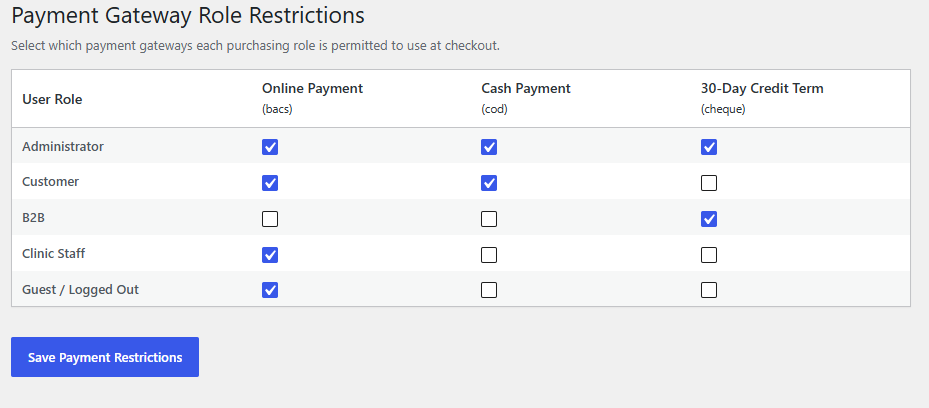
5. Unlocking Seamless Efficiency for Multi-Tiered Operations
Isolating your retail storefront from institutional wholesale channels brings total clarity to your daily medical operations. Staff can process bulk partner requisitions and retail prescriptions from a single unified dashboard without administrative clutter.
By leveraging smart role-based rules, your practice achieves enterprise-grade distribution capabilities while maintaining absolute simplicity at the billing counter.

Upgrade Your Pharmacy & Dispensary Terminal
Transform WooCommerce into a high-speed clinical dispensary terminal with automated FIFO batch tracking, instant GST tax invoicing, and seamless counter billing.
- ✓ Native FIFO Batch & Expiry Control
- ✓ Automated Intra-State & Inter-State GST Slabs
- ✓ Fast Counter Billing & Staff Permissions
- ✓ 100% Self-Contained — Zero Friction Setup
Proudly Created by Tamhane Health