
Learn how to set up a seamless WooCommerce clinic staff role, manage pharmacy counter permissions, and secure administrative inventory workflows.
Running a modern medical clinic or retail pharmacy requires a collaborative team environment. While the principal practitioner or lead pharmacist maintains absolute oversight of financial reports, tax accounts, and system settings, clinic assistants and junior interns handle the fast-paced daily counter billing.
Managing this operational split efficiently requires granular access control. Standard e-commerce platforms often give every user broad administrative capabilities, creating massive security risks. Clinic Commerce Manager introduces advanced role-based permissions, allowing you to establish a secure WooCommerce clinic staff role that balances counter speed with administrative protection.
1. Why Role-Based Separation is Vital for Pharmacy Counters
During busy clinical hours, multiple staff members may access your billing terminal to dispense medicines, record patient visits, and generate tax invoices. However, allowing assistant staff unrestricted access to backend plugin settings, profit margin reports, or product pricing structures can lead to accidental misconfigurations or data tampering.
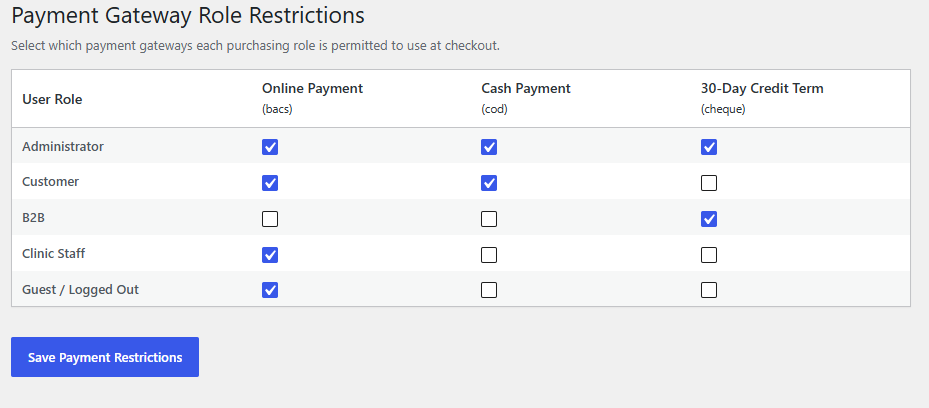
By implementing a dedicated WooCommerce clinic staff role, you grant your team exclusive access to the tools they need for rapid counter billing while locking down sensitive administrative controls.
2. Configuring Staff Permissions and Counter Access
Setting up secure operational workflows begins by defining explicit user capabilities inside your WordPress dashboard. Clinic Commerce Manager integrates seamlessly with standard WordPress role management.
Step-by-Step Access Setup:
- Navigate to WordPress Admin > Users and assign your clinic assistants or junior doctors the designated
Clinic Staffuser role. - Configure plugin permissions to ensure staff members can view product catalogs, manage cart billing, and execute FIFO batch deductions without altering underlying cost prices.
- Restrict access to high-level financial reporting screens, tax configuration panels, and gateway credentials, keeping administrative settings secure.
Once configured, your staff enjoys an uncluttered, high-speed interface tailored specifically for patient checkout and prescription dispensing.
3. Balancing Fast Counter Billing with Administrative Security
A truly effective medical dispensary terminal must eliminate friction during patient interactions while maintaining absolute data integrity. The WooCommerce clinic staff role achieves this balance through targeted interface adjustments:
- Streamlined Point-of-Sale Access: Counter staff can quickly search medical inventories, select formulation types, and process customer payments instantly.
- Cost Price Confidentiality: Purchase costs and batch margin data remain hidden from standard staff views, protecting sensitive supplier pricing.
- Audit Trail Accountability: Every transaction processed by a staff member is logged with their specific user ID, ensuring complete transparency during internal reviews.
4. Tracking Staff-Specific Dispensing Metrics and Reports
Operational oversight is critical for evaluating team performance and managing shift handovers. With structured role permissions in place, your practice gains clear visibility into daily counter activities.
Administrative dashboards track order volumes and dispensing metrics categorized by user accounts. This allows lead practitioners to review shift productivity, monitor cash drawer reconciliations, and ensure that all counter billing aligns perfectly with daily patient footfall.
5. Unlocking Seamless Efficiency Across Your Practice
Separating daily dispensary tasks from high-level management brings total clarity to your healthcare enterprise. By implementing intelligent access controls, your team operates with complete confidence, knowing that front-desk efficiency is supported by robust backend security.
Combined with native FIFO batch tracking, automated low-stock alerts, and CA-audit-ready reporting, your WordPress medical platform functions with the reliability of enterprise software.

Upgrade Your Pharmacy & Dispensary Terminal
Transform WooCommerce into a high-speed clinical dispensary terminal with automated FIFO batch tracking, instant GST tax invoicing, and seamless counter billing.
- ✓ Native FIFO Batch & Expiry Control
- ✓ Automated Intra-State & Inter-State GST Slabs
- ✓ Fast Counter Billing & Staff Permissions
- ✓ 100% Self-Contained — Zero Friction Setup
Proudly Created by Tamhane Health