
Resolving coupon code discrepancies in your WordPress store is critical when running a hybrid medical practice that sells both clinical services and health products. The Clinic Commerce Manager plugin bridges standard WooCommerce e-commerce with real-world clinical operations. However, generic discount rules often fail when applied to complex medical inventory.
When a patient applies a site-wide promotional code at checkout, standard WooCommerce logic treats all cart items equally. This creates financial and regulatory conflicts for healthcare practices operating online.
Why Resolving Coupon Code Discrepancies Matters for Medical Stores
Medical e-commerce operates under strict accounting and legal constraints compared to typical retail outlets. Resolving coupon code discrepancies prevents revenue leakage and protects your practice from accounting errors.
1. Prescription Price Controls vs. Margin Erosion
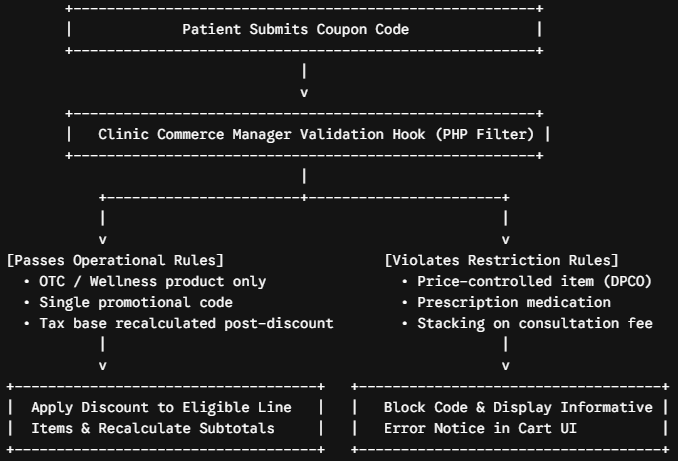
Certain prescription medications operate on fixed margins or government-regulated pricing structures. If a flat 15% discount code applies across the entire cart, prescription items can quickly sell below cost, causing margin erosion.
2. Tax (GST) Recalculation Bugs
In healthcare commerce, items carry variable tax brackets—ranging from exempt services to 5%, 12%, or 18% GST categories. Standard cart hooks often miscalculate line-item tax bases when discounts split across mixed tax rates, leaving manual reconciliation headaches in Tally.
3. Stacking Conflicts on OPD Consultations
Patients purchasing pre-paid consultation slots alongside physical products should not combine promotional coupons with already-discounted treatment packages.
Common Edge Cases in WooCommerce Clinic Checkout
Understanding where calculations break down allows you to configure rules that prevent store failure.
| Edge Case Scenario | Default WooCommerce Behavior | Clinic Commerce Manager Resolution |
| Mixed Cart (Rx + OTC) | Applies discount proportionally across all items. | Isolates discount calculations strictly to OTC/Wellness category IDs. |
| Coupon Stacking | Allows multiple codes if allowed globally in settings. | Enforces strict single-promotion logic for clinical packages. |
| Post-Discount Tax Base | Can miscalculate line-item tax split across split rate brackets. | Recalculates exact taxable value per item after itemized discount distribution. |
| Zero-Margin Products | Reduces price below minimum threshold. | Checks item custom metadata (_min_floor_price) before validation. |
Technical Strategy for Resolving Coupon Code Discrepancies
To resolve coupon code discrepancies systematically, Clinic Commerce Manager intercepts cart validation hooks using custom PHP logic inside WordPress.
Method 1: Filtering Item Eligibility via Custom Categories
Instead of relying on global settings, inspect every item in the cart before applying discounts.
Method 2: Adjusting Line-Item Tax Recalculations
When a discount applies to an eligible line item, tax totals must update dynamic subtotals accurately before sending payload receipts downstream.
Best Practices for Clinic E-Commerce Discount Auditing
Resolving coupon code discrepancies isn’t just about writing code; it requires clear operational workflows for administrative staff.
- Maintain Excluded Tax Classes: Keep prescription medications inside a dedicated WooCommerce Tax Class so discount engines recalculate tax bases independently from standard retail goods.
- Set Floor Prices in Metadata: Store absolute minimum prices in product custom fields. Ensure cart hooks block coupon discounts from dipping below these cost boundaries.
- Audit Monthly Coupon Usage: Review discount usage logs against sales receipts to verify that tax subtotals match external accounting ledgers cleanly.
Helpful Resources & Further Reading
For further reading on WooCommerce developer hooks and official tax compliance documentation, refer to the following resources:
- Developer Guidelines: Review the official WooCommerce Conditional Coupon Validation Hooks documentation for advanced cart manipulation.
- WordPress Standards: Consult the WordPress Plugin Developer Handbook for best practices on writing secure sanitization routines.
- Tax Integrity & Compliance: Reference the official Central Board of Indirect Taxes and Customs (CBIC) portal for updated HSN codes and statutory healthcare tax exemptions.
By resolving coupon code discrepancies directly within the Clinic Commerce Manager plugin workflow, your WooCommerce store gains a robust, audit-proof checkout process that keeps clinical operations smooth, compliant, and profitable.